
Fumbling for keys with your hands full, wondering if you locked the door, or handing out spare keys to family. A regular deadbolt makes all of that harder than it needs to be.
Veise sent me its Veise VE027-K WiFi Smart Lock, and I installed it on my front door. It’s been a solid upgrade. It adds a lot of convenience while still feeling sturdy and dependable.
In this Veise smart lock review, I’ll cover what it is, the specs, the key features, how I installed and used it, the pros and cons, who it’s for, and some common questions.

Products Used in My Veise Video
👉 Veise VE027-K WiFi Smart Lock
For business inquiries and collaborations: luisangel@aemind.com
Affiliate Disclosure: I was sent this product by the manufacturer to review. If you purchase an item through the links provided, I may receive a commission, at no additional cost to you. Thank you for supporting the channel.
What Is the Veise VE027-K Smart Lock?
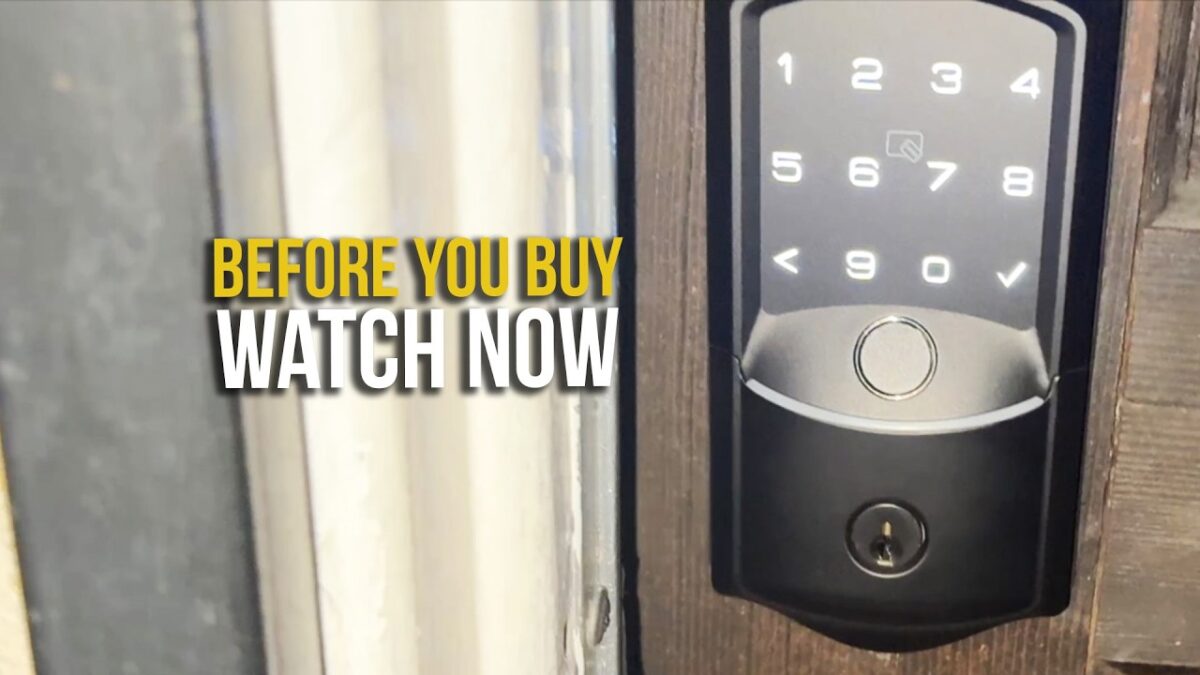
The Veise VE027-K WiFi Smart Lock is a keyless smart deadbolt for your front door. It has built-in 2.4GHz WiFi, so it connects straight to your home network with no separate hub.
You can unlock it with your fingerprint, a passcode on the keypad, the app, an IC card, your voice through Alexa or Google Assistant, or a backup mechanical key. Veise counts eight ways to enter in total. The VE027-K version comes as a set with two knobs.
Veise VE027-K Specs
From the Amazon listing and my video description:
- Model: Veise VE027-K (deadbolt with 2 knobs set)
- Connectivity: built-in 2.4GHz WiFi, no hub required; the listing also lists Bluetooth
- Fingerprint: 0.2-second recognition, stores up to 20 fingerprints, per Veise
- Passcodes: up to 100 custom passcodes, plus one-time codes
- Digital keys: Permanent, Scheduled, One-time, and Expiring, per Veise
- Other entry: app, IC card, mechanical key, and voice
- Voice control: Alexa and Google Assistant
- Auto-lock: adjustable from 10 to 180 seconds
- Power: 8 AA batteries (not included), rated for up to 240 days, per Veise
- Weather rating: IP65
- Security standard: built to BHMA/ANSI Grade 3, per the listing
- In the box, per the listing: 2 backup keys, 2 IC cards, mounting plate, screws, latch, strike, and manuals
- Weight: about 3.3 pounds
Key Features
- Built-in 2.4GHz WiFi with no hub required
- Fast fingerprint unlock
- Remote app control and access sharing
- Backlit electronic keypad with multiple passcodes
- IC card and mechanical key backup
- Voice control with Alexa and Google
- Adjustable auto-lock timer
- Activity alerts and access logs in the app
- IP65 weatherproof rating
- Easy DIY installation
How I Installed and Used It
The first thing I did was install it on my front door. The setup only takes a screwdriver, and the lock automatically adjusts for the direction of the door. Then I set up the built-in WiFi connection, registered fingerprints, and created passcodes in the app.
In my video, you can see me unlocking the door with the fingerprint sensor. It responds almost instantly. The keypad lights up clearly, and entering a code feels smooth and responsive.
You can also unlock it through the app from anywhere, use voice control, or share access digitally. That’s handy when family or guests are coming over and you aren’t home.
I tested the auto-lock timing too. Auto-lock kicks in after a set time, which keeps the door secure without me thinking about it. That gives me peace of mind when I’m leaving the house.
Activity alerts and access logs show up right on my phone, so it’s easy to keep track of who came and went. On the front door, the weatherproof build handled outdoor exposure without any issue, and overall it’s felt reliable for daily use.
What Amazon Buyers Say
Amazon’s review summary says buyers find it reliable and easy to install and set up. They like the many ways to lock and unlock, the auto-lock feature, and the fingerprint recognition, with one buyer saying it accepts fingerprints on the first try. Buyers also like the look and the Alexa connection. It holds a 4.5 out of 5 star rating at the time of writing.
Pros and Cons
Pros
- Built-in WiFi, no hub needed
- Fingerprint unlock is almost instant
- Lots of ways to get in, including a backup key
- Auto-lock you can adjust
- Access logs and alerts on your phone
- DIY install with just a screwdriver
- IP65 weatherproof
Cons
- WiFi is 2.4GHz only
- Uses 8 AA batteries, which aren’t included
- Rated BHMA/ANSI Grade 3, the entry level of that standard
Who Is It For?
The Veise VE027-K WiFi Smart Lock is for:
- Families who want everyone to have their own way in
- Anyone who forgets keys or comes home with full hands
- Hosts and landlords who want scheduled or one-time codes
- Alexa and Google Assistant homes
- DIYers who want a smart lock without hiring a pro
Frequently Asked Questions
Does the Veise smart lock need a hub?
No. It has built-in 2.4GHz WiFi.
How many fingerprints and codes can it store?
Veise says up to 20 fingerprints and up to 100 passcodes.
Does it work with Alexa and Google?
Yes, both.
Is there a backup key?
Yes. It comes with 2 backup keys and 2 IC cards, per the listing.
How long do the batteries last?
Veise says up to 240 days on 8 AA batteries.
Is it hard to install?
No. I installed it with just a screwdriver, and it adjusts for the door direction automatically.
Final Verdict
If you want a smart front door lock with multiple access options and built-in WiFi control, the Veise VE027-K WiFi Smart Lock is a reliable choice. The fast fingerprint reader, auto-lock, and access logs made my front door more convenient and gave me more peace of mind.
Watch My Veise Smart Lock Review
In my video, I show the Veise VE027-K WiFi Smart Lock installed on my front door with fingerprint, keypad, and app unlocking. You can watch it on my YouTube channel, Home Smart by AE Mind:
▶ Main Door Smart Lock Veise Keyless Entry | Install On Front Door Home Phone WiFi Doorlock VE027-K
👉 Veise VE027-K WiFi Smart Lock
For business inquiries and collaborations: luisangel@aemind.com
I was sent this product by the manufacturer to review. If you purchase an item through the links provided, I may receive a commission. Thank you for supporting the channel.