
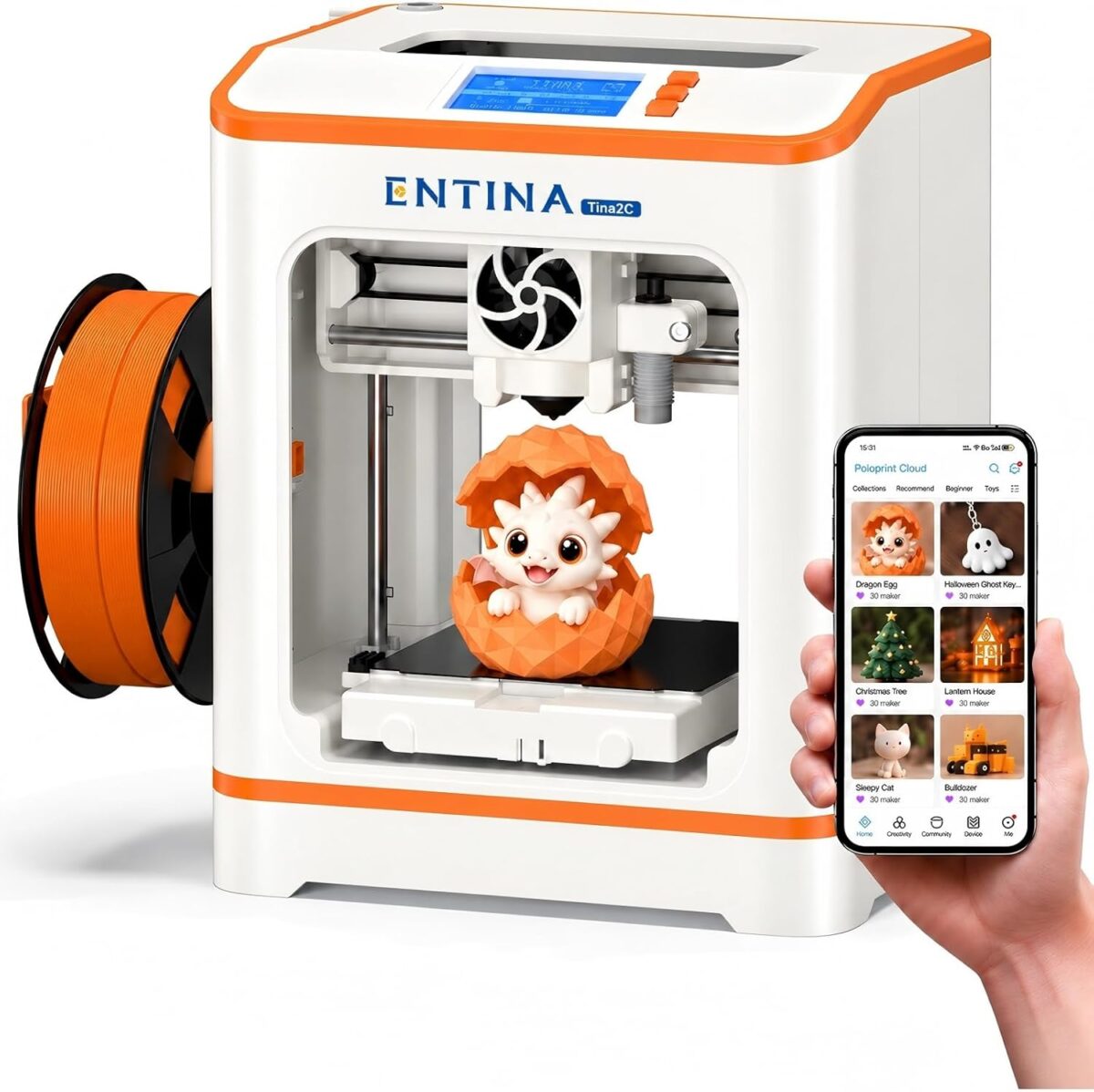
Entina’s Tina2C is a mini 3D printer that ships fully assembled and is aimed squarely at families. Its Amazon listing says it can be set up in “as little as 5 minutes,” and it sells for $188.99 there. Entina’s own Tina2 Series compare page labels the Tina2C “Best for: Kids & families,” with parents and teachers named as the expected buyers and setup rated “Easiest.” This Tina2C review covers what Entina and Amazon say about the printer: its specs, the safety details parents should know, the Poloprint Cloud app and the kinds of projects kids can print on it.
I bought a Tina2C on Amazon with my own money, and it’s on its way. I haven’t printed on it yet, so everything below comes from Entina’s documents and the Amazon listing. I’ll add a hands-on update with photos and print results once I’ve used it with my family.
Entina Tina2C specs at a glance
Price and ratings checked on Amazon Oct 26, 2026. I may earn a commission from links in this post, at no cost to you.
| Spec | Entina Tina2C | Source |
|---|---|---|
| Price | $188.99 (Amazon); $199 Basic Kit (Entina store) | Amazon; entina3d.com |
| Build volume | 100 x 100 x 100 mm (3.9 in cube) | Entina; Amazon |
| Nozzle | 0.4 mm quick-release; 0.1–0.4 mm layers | Entina |
| Max nozzle temperature | 245 °C | Entina FAQ and manual |
| Heated bed | None | Entina FAQ |
| Bed | Flexible magnetic spring-steel plate | Entina; Amazon |
| Leveling | 9-point automatic | Entina manual |
| Filament | 1.75 mm PLA, PLA Pro, TPU; spools up to 1 kg | Entina FAQ |
| Print speed | 70 mm/s print, 150 mm/s travel | Entina compare page |
| Connectivity | 2.4 GHz Wi-Fi, TF/microSD card, USB-C | Entina; Amazon |
| App and slicers | Poloprint Cloud (iOS/Android); WiiBuilder, Cura; Kiri for ChromeOS/iPadOS | Entina manual |
| Power | 110–240 V, 60 W | Entina manual |
| Weight | 5.5 lb (Amazon); 2.5 kg (Entina) | Amazon; Entina |
| Size | About 200 x 165 x 252 mm | Entina compare page |
Check the Entina Tina2C price on Amazon
Sources: Entina Tina2C product page, Entina Tina2 Series compare page and FAQ, the Tina2C user manual hosted on Amazon, and the Amazon listing for ASIN B0H5V6K81F.
Is the Tina2C an easy 3D printer for kids to set up?
Setup is the Tina2C’s main pitch. The printer arrives assembled, and Entina’s Amazon listing says the first steps take “as little as 5 minutes.” An older Amazon listing for the same model (ASIN B0GR8RRC3R) promises a first print “as fast as 8 minutes.” Either way, there’s no frame to build and no belts to tighten, according to Entina.
Entina says the printer levels its bed automatically with a 9-point routine, which removes the fiddliest step for new users. The company’s setup guidance adds one manual check: confirm the Z-offset (the gap between the nozzle and the bed) during first setup and after swapping the nozzle. Pairing happens through the Poloprint Cloud phone app over 2.4 GHz Wi-Fi, per the listing. Families without reliable Wi-Fi near the printer can print from a TF card instead, according to Entina’s manual.
For a parent, that means the first session can be about choosing a model with a child rather than calibrating a machine. I’ll report how long my own setup takes in the hands-on update.
What age is the Tina2C for?
Entina doesn’t list an official minimum age that I could find. What it does say is who should buy it: the compare page names parents and teachers as the recommended buyers and pitches the Tina2C at “Kids & families.” In the same lineup, Entina points teens toward the Tina2Plus and general first-time users toward the Tina2S. That makes the Tina2C the brand’s entry point for younger makers working alongside an adult.
Entina’s safety notice is clear on supervision: “Use the printer indoors and supervise younger users at all times.” In practice, younger kids can browse the app, choose a model and press print with a parent nearby, while older kids can learn slicing in Cura or Kiri on a Chromebook or iPad, which Entina’s manual lists as supported. My view: it fits elementary-age kids printing with a parent, and older kids who want to work more on their own with the adult rules below.
Tina2C safety: open frame, 245 °C nozzle, no heated bed
Parents should know three things about the hardware. First, the nozzle reaches up to 245 °C, according to Entina’s FAQ and manual. Second, Entina’s FAQ says the Tina2C “does not use a heated bed,” so there is no hot build plate to touch, which also limits it to materials that print on an unheated surface, such as PLA and TPU. Third, the printer has an open front, not a fully enclosed chamber, based on Entina’s product photos. Amazon’s older listing describes “smooth rounded edges” on the body.
Entina’s notice warns: “The nozzle and other heated components become hot during printing and shortly afterward — avoid contact until fully cooled.” A simple house rule works with any printer: hands off while it prints, and wait for the nozzle to cool before removing prints or clearing jams.
If an enclosed printer matters more to you, my roundup of the best 3D printer for kids compares other options.
Poloprint Cloud app and model library
Software is where Entina leans hardest into the kids angle. According to the Amazon listing, the Poloprint Cloud app includes 3,500+ ready-to-print models and 25+ DIY projects, so a child can pick something like a keychain or a toy and send it to the printer without designing anything.
The listing also advertises AI text-to-3D and photo-to-3D tools, which turn a typed idea or a picture into a printable model. For families who want to learn real slicing, Entina’s manual lists its WiiBuilder slicer and Cura for Windows and macOS, and Kiri for ChromeOS and iPadOS. The Amazon listing also mentions Simplify3D. Chromebook support matters for kids, since many schools hand them out.
Files can go to the printer over Wi-Fi from the app or on a TF card, per Entina. I’ll report what my kids pick first, and how well the AI tools work, once the printer arrives.
STEM projects for kids on the Tina2C
The 100 mm build cube is small, so this is a printer for small objects. That suits the projects kids usually want: name tags, keychains, figurines, ornaments, desk organizers and parts for school projects. Entina’s older Amazon listing mentions “STEM learning courses,” and the newer one points to the 25+ DIY projects in the Poloprint app.
The printer supports PLA and PLA Pro for rigid parts and TPU for flexible ones, according to Entina’s FAQ. That opens the door to bendy phone grips or bumpers alongside regular toys. A 1 kg spool fits on the side holder, according to Entina.
For classrooms, the small size (about 200 x 165 x 252 mm per Entina), the 60 W power rating and the 5.5 lb weight on Amazon mean it can sit on a desk and move between rooms.
Print speed and noise
Entina lists a 70 mm/s print speed and 150 mm/s travel speed on its compare page. Those are modest numbers, which is typical for a mini printer built for ease of use rather than speed. Layer heights go from 0.1 mm for finer detail to 0.4 mm for faster prints, per Entina.
The Amazon listing describes “quiet operation” and a built-in LED light for watching prints. The listing doesn’t give a decibel figure, so I’ll judge the noise myself in the hands-on update. A printer on a kitchen table or in a bedroom needs to be quiet, so this matters for families.
Tina2C vs a bigger first printer
The trade-off with the Tina2C is size. Its 100 mm cube is much smaller than the 180 mm cube on a printer like the Bambu Lab A1 mini, which I cover in my roundup. In exchange, Entina offers an assembled machine, auto leveling, no heated bed and a kid-focused app at under $200 on Amazon. For a full side-by-side comparison, see my guide to the best 3D printer for kids.
Who should buy the Entina Tina2C
Based on Entina’s specs and positioning, the Tina2C makes the most sense for parents buying a child’s first 3D printer, teachers who want a small classroom machine, and families who care more about easy setup and a ready-made model library than about build size or speed. Families who expect to print large parts should look at a bigger printer.
It’s $188.99 on Amazon as of Oct 26, 2026. Another Amazon listing for the Tina2C (ASIN B0GR8RRC3R) had 361 ratings at $199.99 when I checked.
See the Entina Tina2C on Amazon
Tina2C FAQ
Is the Tina2C good for kids?
Entina designs and markets it for kids and families, with parents or teachers supervising. It comes assembled, levels itself and includes a kid-friendly model library, according to Entina and Amazon.
Does the Tina2C have a heated bed?
No. Entina’s FAQ says it does not use a heated bed. The nozzle reaches up to 245 °C.
What filament does the Tina2C use?
1.75 mm PLA, PLA Pro and TPU, according to Entina.
Does the Tina2C need Wi-Fi?
No. Wi-Fi powers the Poloprint Cloud app, but Entina’s manual says you can also print from a TF card.
What is the Tina2C’s build volume?
100 x 100 x 100 mm, per Entina and Amazon.
Notes and disclosure
I bought the Entina Tina2C on Amazon with my own money. Entina did not sponsor this post or supply a unit. I haven’t used the printer yet, so this review is based on Entina’s published specs and the Amazon listing. I’ll update it with hands-on results and screenshots from my YouTube video.
Prices, ratings and listing details were checked on Amazon on Oct 26, 2026, and they change often. Spec sources: the Entina Tina2C product page, the Entina Tina2 Series compare page and FAQ, and the Tina2C user manual hosted on Amazon. The product image is from Entina’s Amazon listing.
Amazon links in this post are affiliate links. As an Amazon Associate I earn from qualifying purchases, at no extra cost to you.