
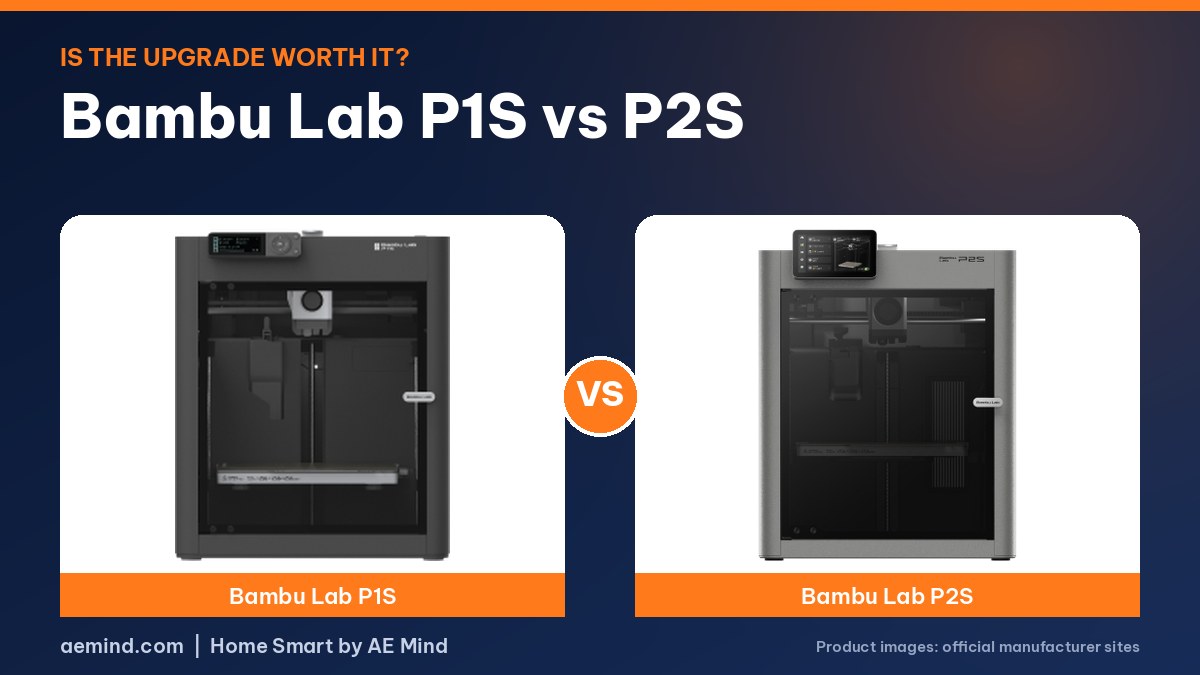
In the Bambu Lab P1S vs P2S comparison, the P2S is the real upgrade for people who want filament drying and easier maintenance, while the P1S remains the value pick. The P2S Combo costs $779 and the P1S Combo $549 (Amazon listings, Oct 16, 2026). They ranked #2 and #1 in Amazon Best Sellers in 3D Printers that day.
The P2S’s quick-swap nozzle was much easier to change than the P1S’s, which needs screws and unplugged connectors, according to Rad Dad’s Print Lab, a YouTube channel that logged more than 500 hours on the P2S and 1,400 on the P1S. Bambu lists up to 600 mm/s for the P2S and an AMS 2 Pro that dries filament at up to 65 °C.
Speed is not the headline. Gray Scalp Miniatures, a YouTube channel that compared the two, did not see a big real-world speed gain.
Bambu Lab P1S vs P2S: Side-by-Side Specs
Prices from Amazon at time of writing. I may earn a commission from links, at no cost to you.
| Spec | Bambu Lab P1S Combo | Bambu Lab P2S Combo |
|---|---|---|
| Price | $549.00 | $779.00 |
| Amazon Best Seller rank | #1 in 3D Printers | #2 in 3D Printers |
| Build volume | 256 × 256 × 256 mm | see Bambu Lab spec page |
| Speed (listed) | 500 mm/s, 20,000 mm/s² acceleration | up to 600 mm/s |
| Buy | Check price | Check price |
Bambu Lab P1S Combo Highlights
- Fully enclosed body
- Includes the AMS for multicolor; up to 16 colors with more AMS units
- Auto bed leveling
- Listed setup time: about 15 minutes
- Ideal filaments: PLA, PETG, TPU, PVA, PET, ABS, ASA; capable: PA, PC; carbon/glass-fiber not recommended
Bambu Lab P2S Combo Highlights
- PMSM servo extruder with active flowrate compensation
- AI failure detection, quick-swap nozzles, automatic calibration
- AMS 2 Pro with built-in filament drying up to 65 °C
- Adaptive Airflow System; can hold a 50 °C chamber; carbon filter
- The P2S alone does not do multicolor; the Combo is required
Which One Should You Buy?
The P2S Combo ($779) lists up to 600 mm/s, a PMSM servo extruder, AI failure detection, an adaptive airflow system that can hold a 50 °C chamber, and the AMS 2 Pro, which dries filament at up to 65 °C.
The P1S Combo ($549) lists 500 mm/s, an enclosed body and the original AMS. If you want filament drying and the newer features, the P2S is the upgrade. If price matters most, the P1S still ranked #1 on October 16, 2026.
How These Picks Were Chosen
The picks and findings on this page come from the Bambu Lab P2S official page, Rad Dad’s Print Lab, Gray Scalp Miniatures and CNC Kitchen, plus the Amazon listings linked above. I have not tested these products myself, so each finding is credited to the source that reported it.
What YouTube Reviewers Found: P1S vs P2S
Here is what independent YouTube reviewers reported. These are their findings, paraphrased and linked so you can watch the full videos. Prices they mention were current when each video was made.
- In a non-sponsored comparison with 500+ hours on the P2S and 1,400+ hours on the P1S, the P2S quick-swap nozzle was much easier than the P1S, which needs screws and unplugged connectors (Rad Dad’s Print Lab, “Bambu Lab P2S or P1S? After Hundreds of Hours, Here’s My Pick”).
- The P2S camera is a big upgrade. It also has an automatic rear flap to regulate chamber air, while the P1S manual approach is to open the lid and door for PLA and PETG (Rad Dad’s Print Lab, “Bambu Lab P2S or P1S? After Hundreds of Hours, Here’s My Pick”).
- The P2S nozzle system is shared with Bambu’s newer printers, and a hardened steel extruder gear and nozzle come standard. One reviewer did not see a big real-world speed gain (Gray Scalp Miniatures, “Bambu Lab P1S Vs P2S: Which One Should You Buy?”).
- The P2S adds two internal LED bars and a full HD camera. One downside raised: it no longer filters exhaust air when printing PLA or PETG (CNC Kitchen, “The P2S Is the Upgrade No One Expected”).
Video: Rad Dad’s Print Lab, “Bambu Lab P2S or P1S? After Hundreds of Hours, Here’s My Pick”
Frequently Asked Questions
What is the price difference between the P1S and P2S Combo?
On October 16, 2026, the P1S Combo listed at $549.00 and the P2S Combo at $779.00, a $230 difference. Prices change often.
Does the P2S dry filament?
The AMS 2 Pro in the P2S Combo has built-in drying up to 65 °C, according to the listing.
Can the P2S print multicolor without the AMS?
No. The listing says the P2S alone does not support multicolor printing; the Combo version is required.
Sources
- Amazon listing: Bambu Lab P1S Combo
- Amazon listing: Bambu Lab P2S Combo
- Amazon Best Sellers in 3D Printers (snapshot Oct 16, 2026)
- Bambu Lab P2S official page
Related: Bambu Lab A1 vs P1S | Creality K2 vs Bambu Lab P2S | Best 3D Printer Under $500
Notes and disclosure
Note: Specs and prices below come from Amazon listings and Amazon Best Sellers in 3D Printers at time of writing. Prices and ranks change often, so check the current listing.