
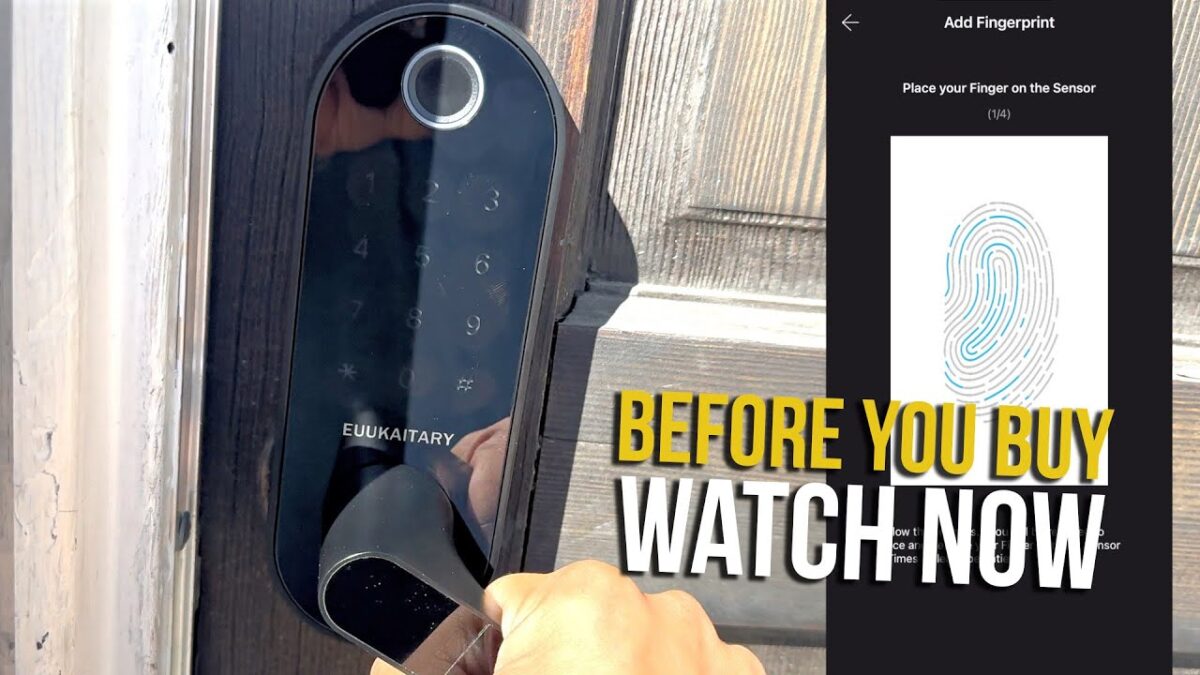
Fumbling for keys with your hands full, wondering if you locked the door after you left, or handing out spare keys to family and guests all get old fast. A smart door lock with a fingerprint reader and keypad fixes all of that.
I replaced the knob on my front door with the EUUKAITARY Smart Door Lock, a keyless door handle with fingerprint, keypad, and app access. This video was originally posted on my Ryzzun YouTube channel.
Availability update (Oct 17, 2026): The EUUKAITARY smart door lock reviewed here is currently unavailable on Amazon. A comparable in-stock fingerprint handle lock is the Philips Wi-Fi Smart Lock with Handle, which lists fingerprint, app, PIN, voice and key entry with built-in Wi-Fi, at $129.99 (Amazon price from Amazon at time of writing).
In this EUUKAITARY smart lock review, I’ll cover what it is, the specs, the key features, how I installed and set it up, the pros and cons, who it’s for, and some common questions.
Products Used in My EUUKAITARY Lock Video
👉 EUUKAITARY 6-in-1 Smart Door Lock with Handle
For business inquiries and collaborations: luisangel@aemind.com
Affiliate Disclosure: I was sent this product by the manufacturer to review. If you purchase an item through the links provided, I may receive a commission, at no additional cost to you. Thank you for supporting the channel.
What Is the EUUKAITARY Smart Door Lock?
The EUUKAITARY Smart Door Lock is a keyless entry door handle that replaces a standard knob. EUUKAITARY calls it 6-in-1 because you can unlock it six ways: fingerprint, passcode, the app, voice through Alexa or Google Home, a card or fob, or a regular key.
It has WiFi built in, so it connects straight to your home network without a separate hub. That lets you lock or unlock from anywhere with the app and share temporary codes with guests, cleaners, or dog walkers.
EUUKAITARY Smart Door Lock Specs
From the Amazon listing:
- Model: WLF15-TT/SNL (JKT-WLF15SR)
- Unlock methods: fingerprint, passcode, app, voice (Alexa/Google Home), card/fob, and key
- Connectivity: built-in WiFi and Bluetooth, no gateway needed
- Fingerprints: stores up to 100, unlocking in about 0.3 seconds, per EUUKAITARY
- Passcodes: up to 250, including permanent, temporary, and one-time codes
- Keypad: backlit, with anti-peep code protection
- Auto-lock: after 30 seconds by default, adjustable
- Power: 4 AA batteries (not included), with low-battery alerts; EUUKAITARY says 3 to 5 months per set
- Install: DIY, about 10 minutes per the brand, no drilling on standard US and Canada doors
- Handle: reversible for left- or right-handed doors
- Rating: built to ANSI Grade 3, tested for 20,000+ uses
- Materials: aluminum, copper, and plastic
- In the box: the lock with handle, 2 fobs, 2 keys, latch and strike plate, screws, and a manual
- Warranty: 18 months
Key Features
- Six ways to unlock, including a backup key
- Fast fingerprint reader for keyless entry
- Built-in WiFi for remote access with no hub
- Temporary and one-time codes for guests and service workers
- Auto-lock so you never wonder if you locked the door
- Backlit keypad for unlocking in the dark
- Anti-peep codes so nobody can read your code over your shoulder
How I Installed and Set It Up
Removing the Old Knob
First, I took the old knob off my front door. It was easy.
What’s in the Box
The box includes a manual with all the setup steps, spare keys, all the screws, and the handle itself.
Installation
I put in the latch, chose the handle direction (the right side for my door), screwed in the lock mechanism, locked the back plate in place, connected the wire to the back of the handle, and screwed it all together. It worked like a charm.
Batteries and Key Backup
You need four AA batteries, which aren’t included. I tried the regular key first, and it unlocked the door easily, so you always have a backup.
App Setup
To set up the security features, you download the app. That’s where you add your fingerprint, create a custom keypad code, and more. It’s very intuitive.
Things to Consider Before Buying
- Batteries not included: grab four AA batteries before you start.
- Check your door: it’s built for standard US and Canada doors.
- WiFi range: for remote access, the lock needs a decent WiFi signal at the door.
- Grade 3: ANSI Grade 3 is a residential rating. For extra security, pair it with a deadbolt.
EUUKAITARY Smart Door Lock Pros and Cons
Pros
- Fingerprint, keypad, app, voice, fob, and key entry
- Built-in WiFi, no hub needed
- Easy DIY installation with no drilling
- Temporary and one-time codes for guests
- Auto-lock and anti-peep protection
- Physical key backup
- Intuitive app setup
Cons
- Batteries not included
- Needs a good WiFi signal for remote features
- Grade 3 residential rating
Who Is It For?
The EUUKAITARY Smart Door Lock is a great fit for:
- Homeowners who want keyless entry at the front door
- Families who keep losing or sharing keys
- Airbnb hosts and landlords who need to give guests temporary codes
- Parents who want auto-lock peace of mind
- Anyone upgrading to a smarter, more secure home
Frequently Asked Questions
How many ways can you unlock the EUUKAITARY lock?
Six: fingerprint, passcode, app, voice through Alexa or Google Home, card/fob, and key.
Does it need a hub?
No. It has built-in WiFi and connects directly to your home network.
What batteries does it use?
Four AA batteries, which aren’t included. EUUKAITARY says they last 3 to 5 months.
Can I still use a key?
Yes. It comes with keys, and the key unlocked my door easily.
Is installation hard?
No. I removed my old knob and installed it myself. EUUKAITARY says it takes about 10 minutes with no drilling.
How many fingerprints and codes can it store?
Up to 100 fingerprints and 250 passcodes, per the listing.
Does it lock automatically?
Yes, after 30 seconds by default, and you can adjust it.
Final Verdict
The EUUKAITARY Smart Door Lock was easy to install, the app was intuitive, and it gives you just about every way to unlock your door, with a regular key as a backup. If you want to upgrade your front door to keyless entry with remote access and auto-lock, it’s a solid choice.
Watch My EUUKAITARY Lock Review
In my video, I remove my old knob, install the EUUKAITARY Smart Door Lock, and test the key. You can watch the full video on my YouTube channel, Ryzzun:
▶ EUUKAITARY Keyless Fingerprint Smart Door Lock | Built-In WiFi, App Remote, Auto-Lock & Keypad
👉 EUUKAITARY 6-in-1 Smart Door Lock with Handle
For business inquiries and collaborations: luisangel@aemind.com
I was sent this product by the manufacturer to review. If you purchase an item through the links provided, I may receive a commission. Thank you for supporting the channel.