
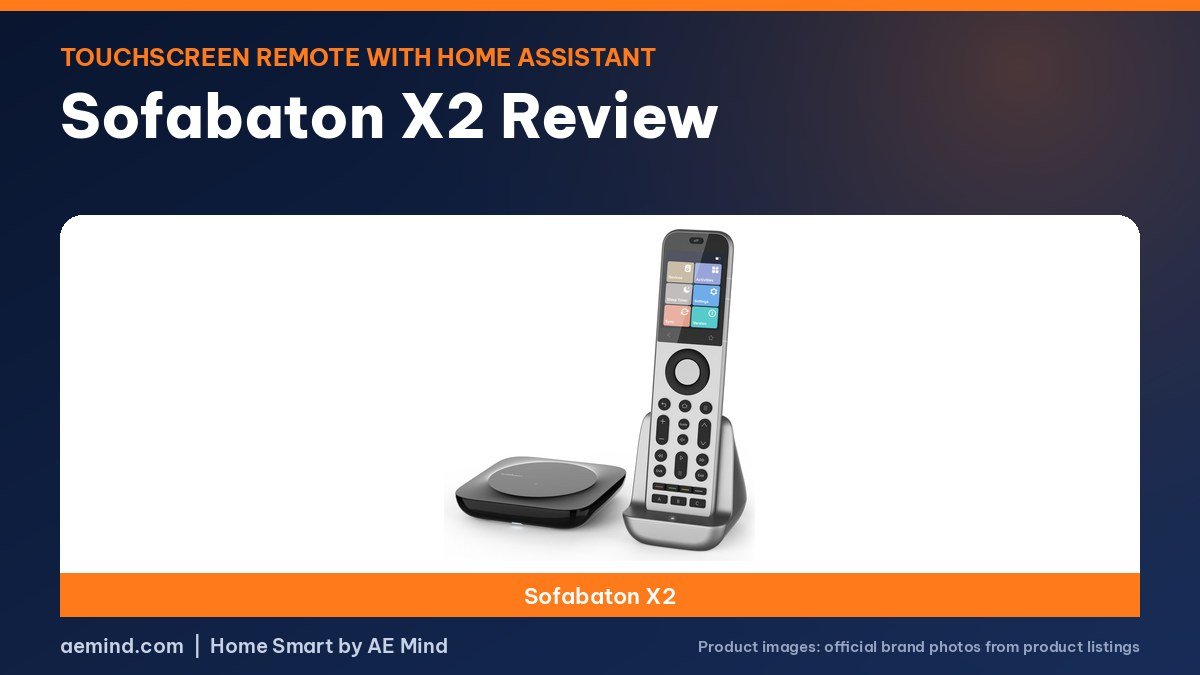
This Sofabaton X2 review finds a touchscreen universal remote that fixes the biggest gaps of the older X1S, according to Smart Home Solver, the YouTube channel run by Reed Kleinman, who has about 737,000 subscribers and covers practical home automation and Home Assistant setups.
Reed used the X1S for about a year before moving to the X2, and two home theater YouTubers have since put it next to rival remotes. Here is what they found, how the Home Assistant buttons work, and what the remote costs as of October 21, 2026.
Sofabaton X2 review: price and key specs
Prices checked on Amazon Oct 21, 2026. I may earn a commission from links, at no cost to you.
| Remote | Price (Oct 21, 2026) | Why it fits | Link |
|---|---|---|---|
| Sofabaton X2 | $359.99 | 2.4-inch touchscreen, charging dock, IR in the remote and hub, MQTT for Home Assistant | Check price |
| Sofabaton X2 | |
|---|---|
| Screen and controls | 2.4-inch touchscreen plus buttons |
| Infrared | IR on the remote and the hub, plus wired IR extenders; optional room repeater |
| Charging | Charging dock |
| Devices | Up to 50 devices (listed) |
| Home Assistant | Yes, MQTT virtual buttons |
| Body | Metal |
| Buy | Check price |
Sofabaton X2 review: what changed from the X1S
In his video, Smart Home Solver lists the upgrades that sold him on the Sofabaton X2. It has a charging dock, so the remote is always topped up. A touchscreen sits above the buttons, with a back arrow at the bottom of the screen. The front is metal, which Youthman’s guest also noticed, and the remote has extra buttons you can program.
Infrared is the change that matters most for many setups. The X1S could only send infrared from its hub and two wired blasters. The X2 adds infrared to the remote itself, keeps the hub and wired extenders, and supports an optional repeater for a second room, according to Smart Home Solver and Theater At Home.
Setting it up
Reed says the app now shows how each device is connected, which makes troubleshooting easier. He had to reprogram the infrared codes for his Denon receiver, and he warns that backups from the X1S cannot be imported, so you start fresh. Activities are listed on the touchscreen and you swipe between them.
One tip from his video: the number pad is now on the touchscreen, so if you flip to favorite channels often, map those channels to physical macro buttons instead. Theater At Home adds that if an activity misses a device when it starts, pressing OK on the remote usually sends the command again.
Home Assistant buttons
The X2 can talk to Home Assistant through MQTT. Smart Home Solver walks through the steps: create a Wi-Fi device for Home Assistant in the Sofabaton app, add virtual buttons, copy the MQTT codes, then build automations in Home Assistant that fire when a button is pressed. He uses it to run lights and scenes and says it replaced a dashboard he had been using.
He notes a limit: the virtual buttons belong to each activity. If you want the same light button in every activity, you add it to each one.
Firmware updates since launch
Theater At Home, a home theater YouTube channel reported two firmware changes. The X2 now responds to button presses without waking first, and switching activities powers off devices the new activity does not use. He said the X1S had not received those changes at the time of his video.
How it compares with other remotes
In Youthman, a home theater YouTuber who spent years on a Logitech Harmony Elite, the X2 was called the easiest of three remotes to program and the least expensive, with less flexibility than the Unfolded Circle Remote 3 or the dealer-only Ava Cinema remote. The hosts said all three have charging docks and that each company is still adding features. Mike, Youthman’s guest, said the X1S had not worked for him because his equipment is in a rack in another room, and that the X2 has been working well.
Things to know before you buy
- The Home Assistant buttons are set per activity, so shared buttons have to be added to each one (Smart Home Solver).
- Some infrared codes may need to be relearned; Reed had to redo his Denon receiver.
- The charging indicator on the remote is small, Smart Home Solver notes.
- Setting up from an X1S means starting over, because backups do not transfer.
Price
Amazon lists the Sofabaton X2 at $359.99 as of October 21, 2026. Smart Home Solver said it sells for about $360, with sales near $330, and compared that with a Harmony Elite’s price ten years ago. A remote-only listing also appears on Amazon at a lower price; check whether a listing includes the hub before buying.
Who the Sofabaton X2 is for
- Households that want one remote for a TV, receiver and streaming box, with simple activity buttons.
- Home theaters with gear in a cabinet or another room, thanks to infrared from the hub, extenders and the handset.
- Home Assistant users who want physical buttons for lights and scenes.
- People who do not want to learn a complex configurator; reviewers rated it the easiest of its rivals to set up.
If you want two-way feedback such as now-playing information and volume levels on the remote, reviewers point to the Unfolded Circle Remote 3 instead.
Video: Smart Home Solver: “The Smart Remote I’ve been WAITING for! Sofabaton X2”. Embedded with credit; the findings are the creator’s own.
Video: Theater At Home: “X2 vs X1S – Sofabaton Universal Remote Comparison”. Embedded with credit; the findings are the creator’s own.
Frequently Asked Questions
Is the Sofabaton X2 worth it in this Sofabaton X2 review?
Smart Home Solver called it the smart remote he had been waiting for, citing the dock, touchscreen, infrared in the remote and Home Assistant buttons.
Does the Sofabaton X2 work with Home Assistant?
Yes. It uses MQTT virtual buttons that trigger Home Assistant automations, according to Smart Home Solver.
Can I import my X1S setup into the X2?
No. Smart Home Solver says X1S backups do not import, so you set the X2 up from scratch.
Does the Sofabaton X2 have infrared in the remote?
Yes. Unlike the X1S, the X2 sends infrared from the handset as well as from the hub and wired extenders.
Sources
- Amazon product listings for the products linked above, checked October 21, 2026
- Smart Home Solver: “The Smart Remote I’ve been WAITING for! Sofabaton X2”
- Theater At Home: “X2 vs X1S – Sofabaton Universal Remote Comparison”
- Youthman: “Harmony Is Dead, These 3 Remotes Are Fighting to Replace It”
Related: Best Smart Universal Remote | Sofabaton X2 vs X1S | Best Smart Home Hub
Notes and disclosure
Note: Prices come from Amazon listings (or the maker’s own store where a product is not sold on Amazon) checked on October 21, 2026. Prices change often, so check the current listing. Device counts, battery and range figures are the manufacturers’ listed specs unless a reviewer is credited. The Unfolded Circle Remote 3 is sold by the maker, not on Amazon, so its price is the maker’s published price. Theater At Home said Sofabaton sent the remotes in his comparison; Smart Home Solver’s video description carries a Sofabaton promo code and affiliate links, and he says Sofabaton sent a replacement unit. Which units Youthman and his guest bought versus received is not stated in the video. Test results and tips quoted above come from the YouTube creators credited in each section; they are their findings, not hands-on claims from me.
Affiliate Disclosure: If you purchase an item through the links on this page, I may receive a commission, at no additional cost to you. Thank you for supporting the channel.