
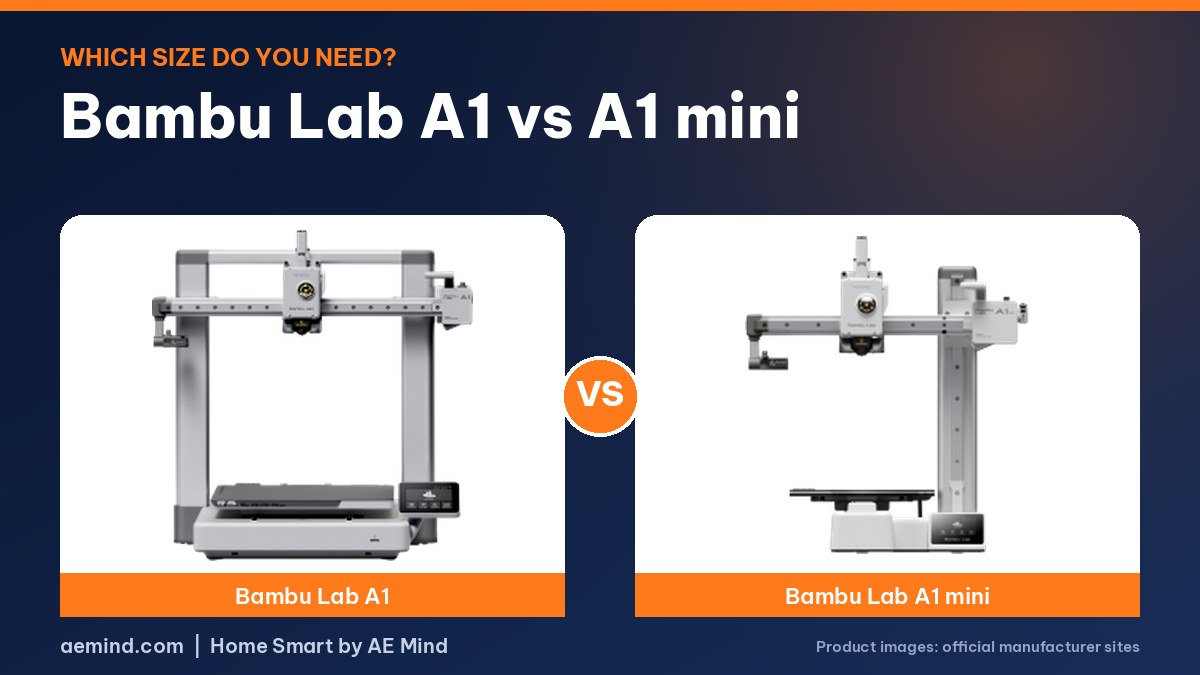
In the Bambu Lab A1 vs A1 mini decision, size is the only real dividing line. About 90% of what one owner prints fits on the smaller mini, according to Rad Dad’s Print Lab, a YouTube channel that bought both at full price.
Bambu lists a 256 mm cube build volume and 22 lb weight for the A1, against 180 mm and 12.1 lb for the mini. Both list a 500 mm/s top speed and automatic calibration. They ranked #4 and #7 in Amazon Best Sellers in 3D Printers on Oct 16, 2026.
The math shifts if you want color. Once you add the AMS lite combo, the percentage price gap shrinks, so Arne Bornheim, a YouTube reviewer, leans toward the full-size A1.
Bambu Lab A1 vs A1 mini: Side-by-Side Specs
Prices checked on Amazon Oct 16, 2026. I may earn a commission from links, at no cost to you.
| Spec | Bambu Lab A1 | Bambu Lab A1 mini |
|---|---|---|
| Price (Oct 16, 2026) | $299.99 | $249.00 (bundle with LED Lamp Kit) |
| Amazon Best Seller rank | #4 in 3D Printers | #7 in 3D Printers |
| Build volume | 256 × 256 × 256 mm | 180 × 180 × 180 mm |
| Speed (listed) | 500 mm/s max speed, 10,000 mm/s² acceleration | 500 mm/s max speed, 10,000 mm/s² acceleration |
| Buy | Check price | Check price |
Bambu Lab A1 Highlights
- Full-auto calibration (Z-offset, bed leveling and more)
- Active flow rate compensation
- 1-clip quick-swap nozzle
- Active motor noise canceling
- Multicolor needs the AMS lite (sold as the A1 Combo or separately)
Bambu Lab A1 mini Highlights
- Automatic calibration
- 1-clip quick-swap hotend
- Bundle includes an LED Lamp Kit for printing your own lamps
- Works with MakerWorld models and the Bambu Handy app
Which One Should You Buy?
The main difference is size. The Bambu Lab A1 lists a 256 mm cube build volume and weighs 22 lb. The A1 mini lists 180 mm and weighs 12.1 lb, and the bundle linked here includes an LED Lamp Kit.
Both list a 500 mm/s top speed and automatic calibration. Pick the mini for small desks and small prints like toys and gifts. Pick the A1 if you want to print larger home items in one piece.
My Planned Test
Planned test: if I get both printers, I plan to print the same model on each and compare setup time, print time, noise and results. I will update this post with the results and add my video when they are done.
What YouTube Reviewers Found: A1 vs A1 mini
Until my own hands-on test is done, here is what independent YouTube reviewers reported. These are their findings, paraphrased and linked so you can watch the full videos. Prices they mention were current when each video was made.
- One reviewer who bought both at full price said the real differences come down to price and build size. About 90% of what they print fits on the A1 mini (Rad Dad’s Print Lab, “Bambu Lab A1 vs A1 Mini Which is Better for You?”).
- The A1 needs extra desk space for the bed to travel front to back. Replacement plates also cost more, about $30 for the A1 vs about $15 for the mini at the time (Rad Dad’s Print Lab, “Bambu Lab A1 vs A1 Mini Which is Better for You?”).
- If you plan to buy the AMS lite combo, the percentage price gap shrinks, so another reviewer leans toward the full-size A1. The mini also makes a good second printer (Arne Bornheim, “Bambu Lab A1 VS A1 Mini – Which is best for beginners?”).
Video: Rad Dad’s Print Lab, “Bambu Lab A1 vs A1 Mini Which is Better for You?”
Frequently Asked Questions
Is the A1 mini big enough?
Its build volume is 180 × 180 × 180 mm. That handles most toys, gifts and small household parts, but larger items need the A1’s 256 mm area or must be split into parts.
Are the A1 and A1 mini equally fast?
Both list a 500 mm/s max speed and 10,000 mm/s² acceleration.
Which is better for kids?
Both are marketed to beginners. The mini is smaller and lighter, which can be easier for a desk or bedroom.
Sources
- Amazon listing: Bambu Lab A1 (B0D17TMWFB)
- Amazon listing: Bambu Lab A1 mini (B0GQMJ8QQT)
- Amazon Best Sellers in 3D Printers (snapshot Oct 16, 2026)
Related: Bambu Lab A1 Review | Best 3D Printer for Kids | Best 3D Printer for Beginners
Notes and disclosure
Note: Specs and prices below come from the Amazon listings and Amazon Best Sellers in 3D Printers as of October 16, 2026. Prices and ranks change often, so check the current listing. Hands-on results will be added after my planned test.
Affiliate Disclosure: If you purchase an item through the links on this page, I may receive a commission, at no additional cost to you. Thank you for supporting the channel.